
Now! you can use docker file to deploy the project in your enviroment.
In first step download all files from Github project from below address:
https://github.com/mir5/passcenter
go to project folder and make sure your docker server is already run.
use this command to create a docker image:
docker build -t pass .your terminal output is:
[+] Building 2.0s (12/12) FINISHED                                                                 docker:desktop-linux
 => [internal] load build definition from Dockerfile                                                               0.0s
 => => transferring dockerfile: 1.21kB                                                                             0.0s
 => [internal] load metadata for docker.io/library/python:3.9-slim                                                 1.2s
 => [internal] load .dockerignore                                                                                  0.0s
 => => transferring context: 2B                                                                                    0.0s
 => [internal] load build context                                                                                  0.6s
 => => transferring context: 854.17kB                                                                              0.5s
 => [1/7] FROM docker.io/library/python:3.9-slim@sha256:4ee0613170ac55ebc693a03b6655a5c6f387126f6bc3390e739c2e6c3  0.0s
 => CACHED [2/7] WORKDIR /app                                                                                      0.0s
 => CACHED [3/7] COPY requirements.txt /app/                                                                       0.0s
 => CACHED [4/7] RUN pip install --upgrade pip                                                                     0.0s
 => CACHED [5/7] RUN pip install --no-cache-dir -r requirements.txt                                                0.0s
 => CACHED [6/7] COPY . /app/                                                                                      0.0s
 => CACHED [7/7] RUN echo "import warnings\nfrom cryptography.utils import CryptographyDeprecationWarning\nwarnin  0.0s
 => exporting to image                                                                                             0.0s
 => => exporting layers                                                                                            0.0s
 => => writing image sha256:860254232d22fedb2df5da7c8c4fd9d17bbf99b5ffa38288fa56b74652c06ef4                       0.0s
 => => naming to docker.io/library/pass                                                                            0.0s

What's next:
    View a summary of image vulnerabilities and recommendations → docker scout quickview
PS D:\Devs\passcenter> docker run -p 8000:8000 pass
docker: Error response from daemon: driver failed programming external connectivity on endpoint nifty_chaplygin (88f990a5dfa8297acedd06237b0536bda7a549222f06f5424c3d8ca8b0058a1e): Bind for 0.0.0.0:8000 failed: port is already allocated.
PS D:\Devs\passcenter> docker build -t pass .
[+] Building 2.0s (12/12) FINISHED                                                                 docker:desktop-linux
 => [internal] load build definition from Dockerfile                                                               0.0s
 => => transferring dockerfile: 1.21kB                                                                             0.0s
 => [internal] load metadata for docker.io/library/python:3.9-slim                                                 3.0s
 => [internal] load .dockerignore                                                                                  0.0s
 => => transferring context: 2B                                                                                    0.0s
 => [1/7] FROM docker.io/library/python:3.9-slim@sha256:4ee0613170ac55ebc693a03b6655a5c6f387126f6bc3390e739c2e6c3  0.0s
 => [internal] load build context                                                                                  0.6s
 => => transferring context: 854.17kB                                                                              0.6s
 => CACHED [2/7] WORKDIR /app                                                                                      0.0s
 => CACHED [3/7] COPY requirements.txt /app/                                                                       0.0s
 => CACHED [4/7] RUN pip install --upgrade pip                                                                     0.0s
 => CACHED [5/7] RUN pip install --no-cache-dir -r requirements.txt                                                0.0s
 => CACHED [6/7] COPY . /app/                                                                                      0.0s
 => CACHED [7/7] RUN echo "import warnings\nfrom cryptography.utils import CryptographyDeprecationWarning\nwarnin  0.0s
 => exporting to image                                                                                             0.0s
 => => exporting layers                                                                                            0.0s
 => => writing image sha256:860254232d22fedb2df5da7c8c4fd9d17bbf99b5ffa38288fa56b74652c06ef4                       0.0s
 => => naming to docker.io/library/pass                                                                            0.0s

What's next:
    View a summary of image vulnerabilities and recommendations → docker scout quickview
Ok. now you have a docker image
use this command to run the image
docker run -p 8000:8000 passthe command run your application on port 8000.
open http://localhost:8000/admin on your browser
default username is admin and default password is iman
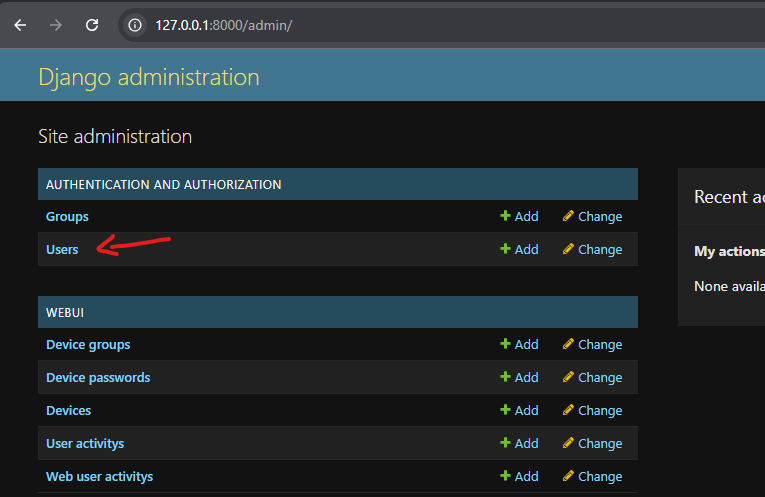
click on Users and add new user.
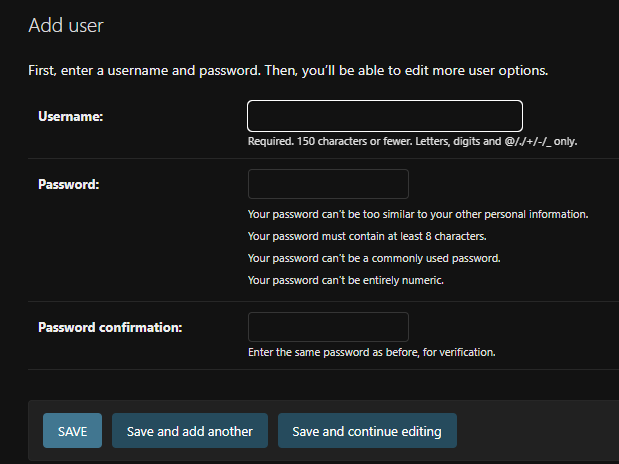
change superadmin password and signout and login with your new defined user.
you can also publish this application on other port and ip address, if you need any support please contact to us, we are ready to help you 🙂
Iman Mir
Leave a Reply